How the GeForce NOW Queue System Works
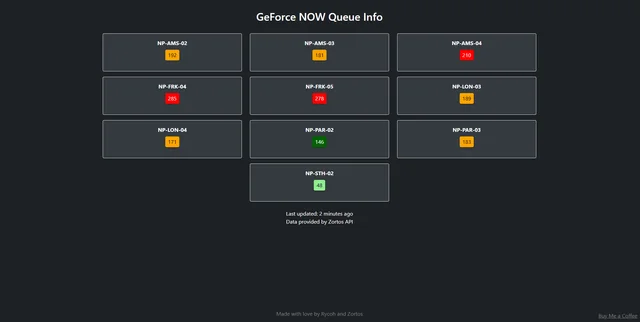
NVIDIA’s GeForce NOW doesn’t provide any public API to check queue positions for their servers. Users had to manually enter each server one by one to see how long they’d have to wait. I reverse-engineered their system to build a queue monitor that now serves 50-60K users daily.
The Problem
GeForce NOW has dozens of servers across different regions (EU, US, CA, etc.). Each server has its own queue, and the only way to know the queue length was to:
- Open GeForce NOW
- Select a game
- Pick a server
- Wait for it to show your queue position
- Repeat for every server you want to check
This was frustrating and time-consuming. I wanted to automate this.
How GeForce NOW Sessions Work
When you launch a game on GeForce NOW, the client creates a session with NVIDIA’s backend. This session contains information about your queue position. The key insight is that you don’t need to actually play a game - just creating a session is enough to get queue data.
The API Endpoints
GeForce NOW uses a REST API hosted on cloudmatchbeta.nvidiagrid.net. Each server has its own subdomain:
https://{SERVER_CODE}.cloudmatchbeta.nvidiagrid.net/v2/sessionFor example:
NP-AMS-02.cloudmatchbeta.nvidiagrid.net- Amsterdam serverNP-FRK-04.cloudmatchbeta.nvidiagrid.net- Frankfurt serverNP-DAL-02.cloudmatchbeta.nvidiagrid.net- Dallas server
Server Codes
Each GeForce NOW server has a unique code. Here are some examples:
# Europe
EU_Servers = [
    "NP-AMS-02", "NP-AMS-03", "NP-AMS-04",  # Amsterdam
    "NP-FRK-04", "NP-FRK-05",                # Frankfurt
    "NP-PAR-02", "NP-PAR-03",                # Paris
    "NP-LON-03", "NP-LON-04",                # London
    "NP-STH-02",                              # Stockholm
    "NP-SOF-01",                              # Sofia
]

# United States
US_Servers = [
    "NP-DAL-02", "NP-DAL-03",  # Dallas
    "NP-ASH-03",               # Ashburn
    "NP-CHI-03",               # Chicago
    "NP-NWK-02",               # Newark
    "NP-PDX-02",               # Portland
    "NP-LAX-02",               # Los Angeles
    "NP-SJC6-02",              # San Jose
    # ... and more
]
Authentication
The tricky part is authentication. NVIDIA uses JWT tokens (GFNJWT) that are required for all API calls. These tokens:
- Are obtained when you log into GeForce NOW
- Expire after a few hours
- Are sent in the
Authorizationheader
To get these tokens programmatically, I use Playwright to automate browser login:
async with async_playwright() as p:
    context = await p.chromium.launch_persistent_context(
        user_data_dir=f"/path/to/profile",
        args=["--headless=new"],
    )

    page = await context.new_page()

    # Intercept requests to capture the JWT token
    async def handle_request(request):
        if "GFNJWT" in str(request.headers.get("authorization", "")):
            token = request.headers["authorization"]
            # Save token for later use

    page.on("request", handle_request)
    await page.goto("https://play.geforcenow.com/")
The bot intercepts network requests and captures the GFNJWT token from the Authorization header.
Creating a Session
Once we have a valid token, we can create a session to check the queue:
def create_session(server, token):
    headers = {
        "User-Agent": "QueueBot/1.0",
        "Authorization": token,
    }

    session_data = {
        "sessionRequestData": {
            "appId": "100163111",  # Demo game ID
            "clientPlatformName": "browser",
            "clientVersion": "26.0",
            # ... other required fields
        }
    }

    response = post(
        f"https://{server}.cloudmatchbeta.nvidiagrid.net/v2/session",
        headers=headers,
        json=session_data
    )

    return response.json()
The appId is important - I use a demo game that’s always available to all users.
Getting the Queue Position
After creating a session, we fetch its details to get the queue position:
def get_queue_position(server, session_id, token):
    headers = {"Authorization": token}

    response = get(
        f"https://{server}.cloudmatchbeta.nvidiagrid.net/v2/session/{session_id}",
        headers=headers
    )

    data = response.json()
    queue_position = data["session"]["seatSetupInfo"]["queuePosition"]

    return queue_position
The response contains seatSetupInfo.queuePosition which tells us exactly how many people are in the queue.
Cleaning Up
After getting the queue data, we must delete the session to avoid taking up server resources:
def clean_session(server, session_id, token):
    headers = {"Authorization": token}

    delete(
        f"https://{server}.cloudmatchbeta.nvidiagrid.net/v2/session/{session_id}",
        headers=headers
    )
Token Pool System
To avoid rate limiting and token expiration issues, I use a pool of bot accounts:
import itertools

def setup_bot_pool():
    with open("BotTokens.json", "r") as f:
        tokens = json.load(f)

    # Cycle through tokens infinitely
    return itertools.cycle(tokens.values())

# Usage
token_iterator = setup_bot_pool()
token = next(token_iterator)  # Get next token in rotation
This distributes requests across multiple accounts and ensures tokens are refreshed before they expire.
The Complete Flow
- Initialize - Load bot tokens into a rotating pool
- For each server:
- Get next token from pool
- Create a session on the server
- Wait a few seconds for queue assignment
- Fetch session details to get queue position
- Delete the session
- Save queue data to JSON
- Upload - Push data to the website API
- Repeat - Loop every ~20 seconds
async def check_all_servers():
    for server in ALL_SERVERS:
        token = next(token_pool)

        # Create session
        session = create_session(server, token)
        session_id = session["session"]["sessionId"]

        time.sleep(3)  # Wait for queue assignment

        # Get queue position
        queue_pos = get_queue_position(server, session_id, token)

        # Save to database
        save_queue_data(server, queue_pos)

        # Cleanup
        clean_session(server, session_id, token)

    # Upload to website
    upload_to_api()

# Run continuously
while True:
    asyncio.run(check_all_servers())
    time.sleep(20)
Challenges
Token Expiration
Tokens expire after ~3 hours. The bot checks token age and refreshes them automatically using browser automation.
Email Verification
NVIDIA sometimes requires email verification. The bot can automatically fetch verification codes from Gmail using IMAP:
async def get_verification_code():
    mail = imaplib.IMAP4_SSL("imap.gmail.com", 993)
    mail.login(EMAIL, APP_PASSWORD)
    mail.select("inbox")

    # Search for NVIDIA emails
    result, data = mail.search(None, "FROM", "account@tmail.nvidia.com")
    latest_email_id = data[0].split()[-1]

    # Extract verification link
    result, data = mail.fetch(latest_email_id, "(RFC822)")
    email_body = data[0][1].decode("utf-8")

    url_match = re.search(r"https://login\.nvgs\.nvidia\.com\S+", email_body)
    return url_match.group(0)
Rate Limiting
By distributing requests across multiple accounts and adding delays between checks, we avoid hitting rate limits.
The Result
The queue monitor now:
- Checks all servers every ~30 seconds
- Serves 50-60K users daily
- Has web and mobile apps
- Partners with other cloud gaming services
Check it out at printedwaste.com/gfn
The full source code is available on GitHub.